PowerRoster User Guide
PowerRoster is a desktop app built to help Freelance Personal Fitness Trainers manage client contacts. It is a centralised client management system for trainers to keep track and access client information such as personal details, gym locations, and individual notes. It is optimized for use via a Command Line Interface (CLI) while still having the benefits of a Graphical User Interface (GUI).
Quick start
Ensure you have Java
17or above installed in your Computer.
Mac users: Ensure you have the precise JDK version prescribed here.Download the latest
.jarfile from here.Copy the file to the folder you want to use as the home folder for your PowerRoster.
Open a command terminal,
cdinto the folder you put the jar file in, and use thejava -jar PowerRoster.jarcommand to run the application.
A GUI similar to the below should appear in a few seconds. Note how the app contains some sample data.
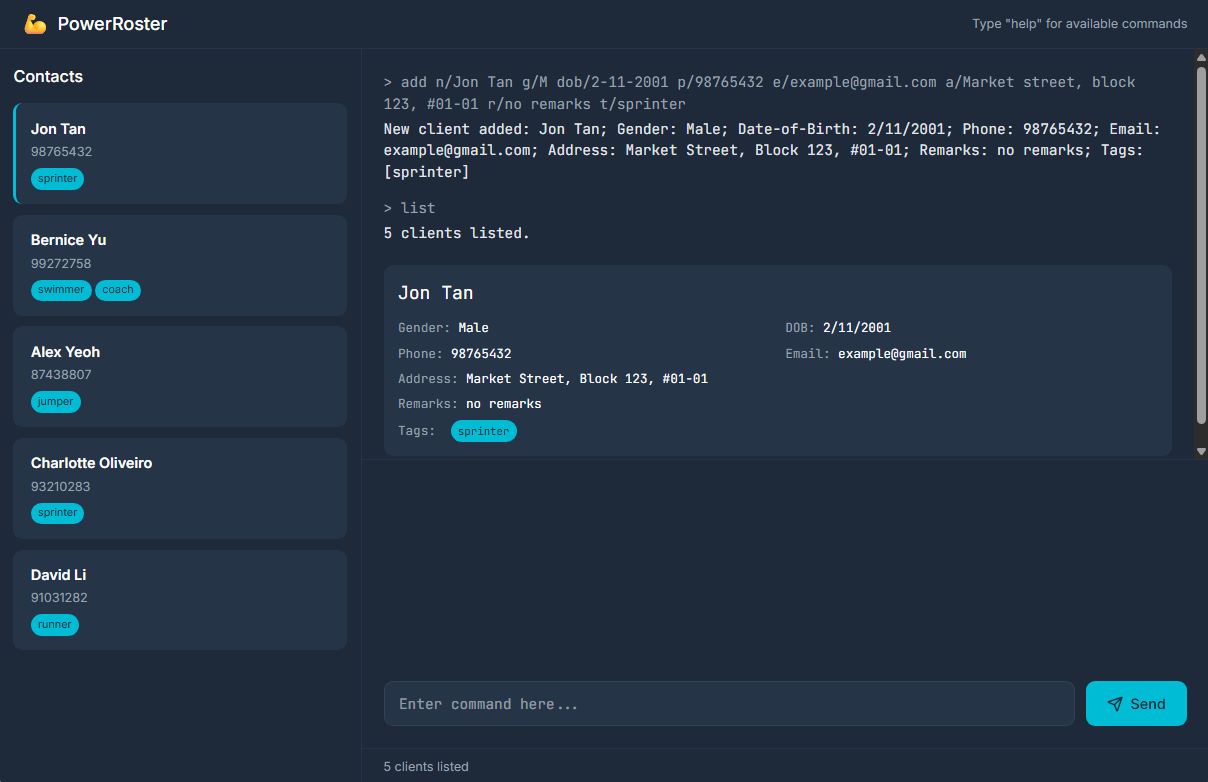
Type the command in the command box and press Enter to execute it. e.g. typing
helpand pressing Enter will open the help window.
Some example commands you can try:list: Lists all contacts.add n/John Tan g/M dob/24/12/1999 p/98765432 e/johnt@example.com a/123 Sengkang East, #01-01 l/ActiveSG @ Fernvale Square t/beginner: Adds a contact namedJohn Tanto the PowerRoster.delete 3: Deletes the 3rd contact shown in the current list.clear: Deletes all contacts.exit: Exits the app.
Refer to the Features below for details of each command.
Features
Notes about the command format:
Words in
UPPER_CASEare the parameters to be supplied by the user.
e.g. inadd n/NAME,NAMEis a parameter which can be used asadd n/John Tan.Items in square brackets are optional.
e.gn/NAME [t/TAG]can be used asn/John Tan t/beginneror asn/John Tan.Items with
… after them can be used multiple times including zero times.
e.g.[t/TAG]…can be used ast/beginner,t/teen t/intermediateetc.Parameters can be in any order.
e.g. if the command specifiesn/NAME p/PHONE_NUMBER,p/PHONE_NUMBER n/NAMEis also acceptable.Extraneous parameters for commands that do not take in parameters (such as
list,exitandclear) will be ignored.
e.g. if the command specifiesexit 123, it will be interpreted asexit.If you are using a PDF version of this document, be careful when copying and pasting commands that span multiple lines as space characters surrounding line-breaks may be omitted when copied over to the application.
Viewing help : help
Shows program usage instructions for all commands or a specific command.

Format: help [COMMAND_WORD]
helpshows usage instructions for all available commands.help COMMAND_WORDshows usage instructions for the specified command only.- The command word is case-insensitive. e.g.
help ADDworks the same ashelp add
Examples:
helpshows all available commands and their usagehelp addshows only the usage instructions for the add commandhelp filtershows only the usage instructions for the filter command
Adding a client: add
Adds a client to PowerRoster.
Format: add n/NAME g/GENDER dob/DATE_OF_BIRTH p/PHONE_NUMBER e/EMAIL_ADDRESS a/ADDRESS [l/LOCATION] [t/TAG]…
- Names with forward slashes (e.g., "s/o" for "son of") are not supported due to the "/" being used as a command delimiter. You can replace the slashes with spaces (e.g., "Muthu s/o Rajan" can be entered as "Muthu s o Rajan".)
- Other names with non-alphanumeric characters like José Muñoz or 小明 should be replaced with suitable alphanumeric characters.
NAMEare case-sensitive for duplicate detectionEMAIL_ADDRESSmust not contain consecutive special characters in the local-part (the part before@).GENDERmust be eitherMorF(case-insensitive)DATE_OF_BIRTHmust follow the format 'DD/MM/YYYY'DATE_OF_BIRTHmust be a valid date, not in the future, and not more than 100 years in the past.- If
l/LOCATIONis omitted, the client is treated as having no specified location and the UI displaysN/A.
Tip: A client can have any number of tags (including 0)
Examples:
add n/John Tan g/M dob/24/12/1999 p/98765432 e/johnt@example.com a/123 Sengkang East, #01-01 l/ActiveSG @ Fernvale Square t/beginneradd n/Danielle Lim g/F dob/13/06/2001 t/athlete e/danielle@example.com a/456 Jurong West, #02-02 l/GymBoxx @ JCube Mall
Listing all clients : list
Shows a list of all clients in PowerRoster.
Format: list
listshows all clients by resetting any active filter, while preserving the current sor order (if any).
Viewing a client's full profile : view
Shows the full profile of a client in the Client Details panel.
Format: view INDEX
- Views the client at the specified
INDEX. The index refers to the index number shown in the displayed client list. The index must be a positive integer 1, 2, 3, … - The detailed profile appears in the right-side Client Details panel.
Examples:
view 1shows the full profile of the 1st client in the current list.find Alexfollowed byview 1shows the full profile of the 1st client in the filtered results.
Editing a client : edit
Edits an existing client in PowerRoster.
Format: edit INDEX [n/NAME] [g/GENDER] [dob/DATE_OF_BIRTH] [p/PHONE] [e/EMAIL] [a/ADDRESS] [l/LOCATION] [t/TAG]…
- Edits the client at the specified
INDEX. The index refers to the index number shown in the displayed client list. The index must be a positive integer 1, 2, 3, … - At least one of the optional fields must be provided.
- Existing values will be updated to the input values.
- Feedback (e.g.
added/updatedorunchanged) is shown per specified field. - If multiple provided field values are invalid in one command, all related validation errors are shown together.
- When editing tags, the existing tags of the client will be removed i.e adding of tags is not cumulative.
- You can remove all the client’s tags by typing
t/without specifying any tags after it.
Examples:
edit 1 p/91234567 e/johndoe@example.comEdits the phone number and email address of the 1st client to be91234567andjohndoe@example.comrespectively.edit 2 n/Dylan Lim t/Edits the name of the 2nd client to beDylan Limand clears all existing tags.
Adding notes to a client : note
Adds / appends a note to an existing client in PowerRoster.
Format: note INDEX n/NOTE or note INDEX a/NOTE
- Adds/appends a note to the client at the specified
INDEX. The index refers to the index number shown in the displayed client list. The index must be a positive integer 1, 2, 3, … - At least one of
n/NOTEanda/NOTEmust be provided, but not both. - Repeated use of the same prefix (e.g.,
n/first n/second) is not allowed. n/NOTEadds a note to the client. Any existing notes will be replaced by the new note.a/NOTEappends a note to the client's existing notes (if any) with a space in between. If the client has no existing notes,a/NOTEbehaves the same asn/NOTE.- You can delete an existing client note by typing
n/without specifying any note after it. - There is no limit to the number of characters in a note.
Examples:
note 1 n/Prefers morning sessions.adds the notePrefers morning sessions.to the 1st client, replacing any existing notes.note 2 a/Just recovered from a knee injury.appends the noteJust recovered from a knee injury.to the 2nd client's existing notes. If the 2nd client has no existing notes, this behaves the same asn/Just recovered from a knee injury..
Assigning a client's workout programme : plan
Assigns / unassigns the workout programme of an existing client in PowerRoster.
Format: plan INDEX wp/PLAN_CATEGORY
- Assigns/unassigns the workout programme of the client at the specified
INDEX. The index refers to the index number shown in the displayed client list. The index must be a positive integer 1, 2, 3, ... - The
wp/prefix is required. PLAN_CATEGORYmust be one of:PUSH,PULL,LEGS,CORE,CARDIO,MOBILITY,FULL BODY,CONDITIONING(case-insensitive).- For multi-word categories, spaces, hyphens, and underscores are all accepted as separators.
- Entering
wp/with no value unassigns the client's assigned workout programme. - Duplicate
wp/prefixes are not allowed. - Workout programmes can only be changed using
plan(notedit).
Examples:
plan 1 wp/PUSHassigns the 1st client to thePUSHprogramme.plan 2 wp/full bodyassigns the 2nd client to theFULL BODYprogramme.plan 3 wp/unassigns the 3rd client's workout programme.
Setting a client's session rate : rate
Sets / clears the session rate of an existing client in PowerRoster.
Format: rate INDEX r/RATE
- Sets/clears the rate of the client at the specified
INDEX. The index refers to the index number shown in the displayed client list. The index must be a positive integer 1, 2, 3, … RATEmust be either blank or a non-negative monetary value with up to 2 decimal places.- Valid examples include
120,120.5,120.50,.50, and120.. - Invalid examples include
-10,1,000,100.000,$100. - Entering
r/with no value clears the client's existing rate. - Rate values are normalized to 2 decimal places when stored and displayed.
- Client rates can only be changed using
rate(notedit).
Examples:
rate 1 r/120sets the 1st client's rate to120.00.rate 2 r/80.5sets the 2nd client's rate to80.50.rate 3 r/clears the 3rd client's rate.
Updating a client's body measurements : measure
Sets / clears body measurements of an existing client in PowerRoster.
Format: measure INDEX [h/HEIGHT_CM] [w/WEIGHT_KG] [bf/BODY_FAT_PERCENTAGE]
- Sets/clears one or more body measurements of the client at the specified
INDEX. The index refers to the index number shown in the displayed client list. The index must be a positive integer 1, 2, 3, ... - At least one of
h/,w/, orbf/must be provided. measure INDEXwithout any ofh/,w/, orbf/is invalid (e.g.,measure 1).HEIGHT_CMmust be either blank or a number in cm between50.0and300.0, with up to 1 decimal place.WEIGHT_KGmust be either blank or a number in kg between20.0and500.0, with up to 1 decimal place.BODY_FAT_PERCENTAGEmust be either blank or a number between1.0and75.0, with up to 1 decimal place.- Trailing-dot values such as
170.are accepted and normalized to 1 decimal place when stored and displayed in the UI. - Entering
h/,w/, orbf/with no value clears that specific measurement. - Measurements can only be changed using
measure(notedit).
Examples:
measure 1 h/175.5sets the 1st client's height to175.5.measure 2 w/72.0 bf/14.8sets the 2nd client's weight and body fat percentage.measure 3 h/ w/ bf/clears all three measurements for the 3rd client.measure 4 w/clears the 4th client's weight.
Changing a client's status : status
Changes the status of an existing client in PowerRoster between active and inactive.
Format: status INDEX s/STATUS
- Changes the status of the client at the specified
INDEX. - The index refers to the index number shown in the displayed client list.
- The index must be a positive integer 1, 2, 3, …
STATUSmust be eitheractiveorinactive(case-insensitive).- Provide only one status prefix (e.g.,
s/active). Providing it more than once (e.g.status 1 s/active s/inactive) will result in an error. - If the client's status is already set to the specified value, a message will be shown and no change will be made.
- New clients are automatically set to
activestatus when added. - Use this feature to mark clients as inactive while retaining their records for future reference.
Examples:
status 1 s/inactivechanges the 1st client's status to inactive.status 2 s/activechanges the 2nd client's status to active.status 3 s/INACTIVEchanges the 3rd client's status to inactive (case-insensitive).
Locating clients by name: find
Finds clients whose names contain any of the given keywords.
Format: find KEYWORD [MORE_KEYWORDS]
- The search is case-insensitive. e.g
hanswill matchHans - The order of the keywords does not matter. e.g.
Hans Bowill matchBo Hans - Only the name is searched.
- Only full words will be matched e.g.
Hanwill not matchHans - Persons matching at least one keyword will be returned (i.e.
ORsearch). e.g.Hans Bowill returnHans Gruber,Bo Yang
Examples:
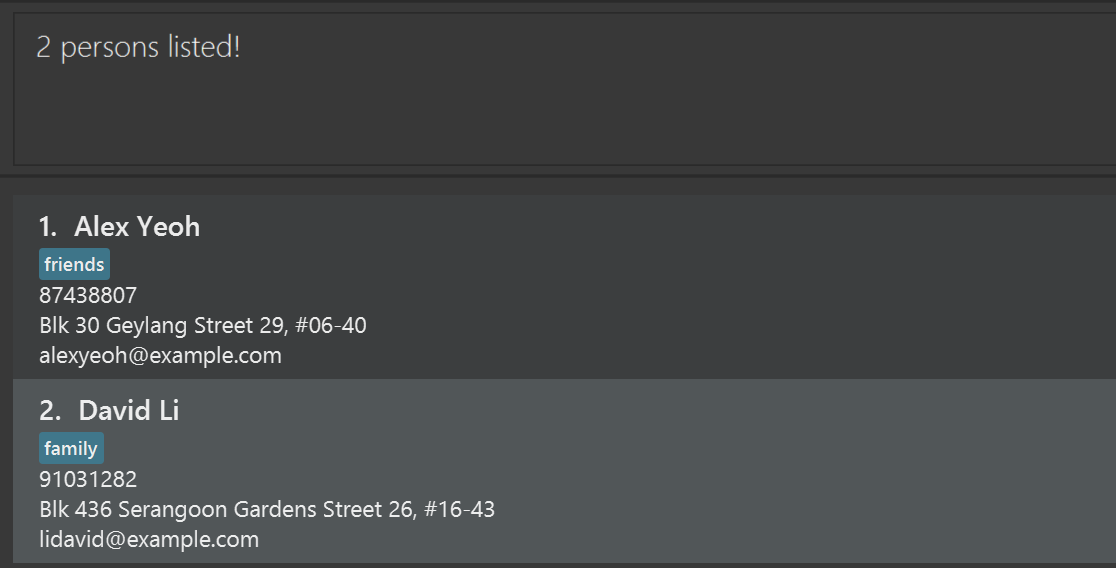
find JohnreturnsjohnandJohn Doefind alex davidreturnsAlex Yeoh,David Li
Filtering clients by location: filter
Filters clients whose gym location contain any of the given location phrase(s).
Format: filter l/LOCATION_PHRASE [l/MORE_LOCATION_PHRASES]...
- At least one
l/prefix must be provided. - The search is case-insensitive. e.g. specifying
l/Clementiwill matchClementi ActiveSG Gym. - Each
l/prefix is treated as one location phrase. e.g.filter l/Anytime Fitness Jurongwill useAnytime Fitness Jurongas a phrase to match. - Multiple
l/prefixes are supported and clients matching at least one phrase are returned (i.e.ORsearch). - Extra spaces within a phrase are normalised. e.g.
filter l/Anytime Fitnesswill be treated asfilter l/Anytime Fitness. - Entering
l/with no value filters clients with no specified location. - If multiple
l/prefixes are provided, each must have a non-blank value. e.g.filter l/Clementi l/is invalid.
Examples:
filter l/Clementireturns all clients whose locations contain the phraseClementisuch asClementi ActiveSG GymandAnytime Fitness Clementi.filter l/Anytime Fitness Jurongreturns all clients whose locations contain the phraseAnytime Fitness Jurongsuch asAnytime Fitness Jurong Eastbut notAnytime Fitness ClementiorJurong Point ActiveSG Gym.filter l/Anytime Fitness l/Clementireturns clients whose locations containAnytime FitnessorClementi.filter l/returns clients with no specified location.
Sorting clients : sort
Sorts the client list by a specified attribute in ascending or descending order.
Format: sort ATTRIBUTE/ [o/ORDER]
- Sorts the currently displayed client list by the specified attribute. If a filter is active, only the filtered results are sorted; if no filter is active, the entire client list is sorted.
- Only one attribute can be specified at a time.
- The order parameter is optional and defaults to ascending (
asc) if not specified. - Supported attributes:
n/- Sort by namel/- Sort by locationdob/- Sort by date of birthp/- Sort by phone numbere/- Sort by email addressa/- Sort by addressg/- Sort by genders/- Sort by status (active before inactive)wp/- Sort by workout plan (alphabetical)r/- Sort by session rate (clients with no rate set sort first)
- Order options:
o/asc- Ascending order (A to Z, earliest to latest, 0 to 9)o/desc- Descending order (Z to A, latest to earliest, 9 to 0)
- The attribute prefix and the order prefix must be separated by a space. For example,
sort n/ o/descis valid, butsort n/o/descis not and will result in an error. - Clients with no location set are always sorted to the end of the list in ascending order, and to the top of the list in descending order, so they do not interleave with real location names.
Examples:
sort n/sorts the displayed client list by name in ascending order (A to Z).sort n/ o/descsorts the displayed client list by name in descending order (Z to A).sort dob/ o/ascsorts the displayed client list by date of birth in ascending order (oldest to youngest).sort l/sorts the displayed client list by gym location in ascending order.sort s/sorts the displayed client list by status, active clients first.sort r/ o/descsorts the displayed client list by session rate, highest rate first.sort wp/sorts the displayed client list by workout plan alphabetically.filter l/Clementifollowed bysort n/filters clients at Clementi locations, then sorts only those filtered results by name.
Deleting a client : delete
Deletes the specified client from PowerRoster.
Format: delete INDEX
- Deletes the client at the specified
INDEX. - The index refers to the index number shown in the displayed client list.
- The index must be a positive integer 1, 2, 3, …
Examples:
listfollowed bydelete 2deletes the 2nd client in PowerRoster.find Betsyfollowed bydelete 1deletes the 1st client in the results of thefindcommand.
Logging a workout session : log
Logs a workout for the specified client.
Format: log INDEX [time/TIME] [l/LOCATION]
- Logs a workout session for the client at the specified
INDEX - The index refers to the index number shown in the displayed client list.
- The index must be a positive integer 1, 2, 3, ...
TIMEmust be a valid date and time not in the future, nor more than 50 years in the past.TIMEmust be in the format: "DD/MM/YYYY HH:mm"- If
TIMEis not declared, the current time will be used. - If
LOCATIONis not specified, the client's preset location will be used. - If
LOCATIONis not specified and the client does not have a preset location,N/Awill be used.
Examples:
log 1Logs a workout for the first client in the displayed list using the current time and their specified location.log 3 time/26/03/2026 14:18Logs a workout for the third client in the displayed list using their specified location and 26/03/2026 14:18 as the workout time.log 2 l/Sengkang ActiveSG GymLogs a workout for the second client in the displayed list using the current time with the location set to "Sengkang ActiveSG Gym"
Retrieving the most recent session: last
Retrieves the details of the most recent workout for the specified client.
Format: last INDEX
- Retrieves details of the most recent workout for the client at the specified
INDEX - The index refers to the index number shown in the displayed client list.
- The index must be a positive integer 1, 2, 3, ...
Examples:
last 5Retrieves the Date and Location of the last workout for the fifth client in the displayed list.
Clearing all entries : clear
Clears all entries from PowerRoster.
Format: clear
Exiting the program : exit
Exits the program.
Format: exit
Saving the data
PowerRoster data are saved in the hard disk automatically after any command that changes the data. There is no need to save manually.
Editing the data file
PowerRoster data are saved automatically as a JSON file [JAR file location]/data/addressbook.json. Advanced users are welcome to update data directly by editing that data file.
Caution:
If your changes to the data file makes its format invalid, PowerRoster will discard all data and start with an empty data file at the next run. Hence, it is recommended to take a backup of the file before editing it.
Furthermore, certain edits can cause the PowerRoster to behave in unexpected ways (e.g., if a value entered is outside the acceptable range). Therefore, edit the data file only if you are confident that you can update it correctly.
Archiving data files [coming in v2.0]
Details coming soon ...
Viewing all workout logs [coming soon]
- Users will be able to view the entire workout log history of a specified client.
Details coming soon ...
Editing and Deleting workout logs [coming soon]
- Users will be able to edit and delete workout logs.
Details coming soon ...
FAQ
Q: How do I transfer my data to another Computer?
A: Install the app in the other computer and overwrite the empty data file it creates with the file that contains the data of your previous PowerRoster home folder.
Known issues
- When using multiple screens, if you move the application to a secondary screen, and later switch to using only the primary screen, the GUI will open off-screen. The remedy is to delete the
preferences.jsonfile created by the application before running the application again. - If you minimize the Help Window and then run the
helpcommand (or use theHelpmenu, or the keyboard shortcutF1) again, the original Help Window will remain minimized, and no new Help Window will appear. The remedy is to manually restore the minimized Help Window.
Command summary
| Action | Format, Examples |
|---|---|
| Add | add n/NAME g/GENDER dob/DATE_OF_BIRTH p/PHONE_NUMBER e/EMAIL_ADDRESS a/ADDRESS [l/LOCATION] [t/TAG]… e.g., add n/John Tan g/M dob/24/12/1999 p/98765432 e/johnt@example.com a/123 Sengkang East, #01-01 l/ActiveSG @ Fernvale Square t/beginner |
| Clear | clear |
| Delete | delete INDEXe.g., delete 3 |
| Log | log INDEX [time/TIME] [l/LOCATION] e.g., log 2 l/Sengkang ActiveSG Gym |
| Last | last INDEX e.g., last 5 |
| Edit | edit INDEX [n/NAME] [g/GENDER] [dob/DATE_OF_BIRTH] [p/PHONE] [e/EMAIL] [a/ADDRESS] [l/LOCATION] [t/TAG]…e.g., edit 2 n/James Lee e/jameslee@example.com |
| Note | note INDEX n/NOTE or note INDEX a/NOTEe.g., note 1 n/Prefers morning sessions. |
| Plan | plan INDEX wp/PLAN_CATEGORYe.g., plan 1 wp/PUSH, plan 2 wp/FULL BODY, plan 3 wp/ |
| Rate | rate INDEX r/RATEe.g., rate 1 r/120.50, rate 2 r/ |
| Measure | measure INDEX [h/HEIGHT_CM] [w/WEIGHT_KG] [bf/BODY_FAT_PERCENTAGE]e.g., measure 1 h/175.5 w/72.0 bf/14.8, measure 2 h/ |
| Status | status INDEX s/STATUSe.g., status 1 s/inactive |
| Find | find KEYWORD [MORE_KEYWORDS]e.g., find James Jake |
| Filter | filter l/LOCATION_PHRASE [l/MORE_LOCATION_PHRASES]...e.g., filter l/Clementi, filter l/Anytime Fitness l/Clementi, filter l/ |
| Sort | sort ATTRIBUTE/ [o/ORDER]e.g., sort n/, sort dob/ o/desc, sort r/ o/desc, sort s/, sort wp/ |
| List | list |
| View | view INDEXe.g., view 1 |
| Help | help [COMMAND_WORD]e.g., help, help add |